

BDA Architects Project Management Dashboard
Project in a Nutshell
A purpose-built web application that replaces spreadsheet-based project tracking for an architecture firm – combining a modular, client-facing dashboard, structured project logs, and controlled read-only sharing that keeps every stakeholder on the same version without exchanging files.
Client & Challenge
Our client is an architecture firm delivering commercial projects for hospitals, universities, and industrial clients across the US. The team was tracking project execution and client reporting in Excel (XLSX) workbooks – one file per project – with manual updates by project managers and email-based distribution to clients.
The Excel-based workflow created three persistent problems: no single source of truth (each stakeholder ended up with a slightly different version of the file); limited visibility for internal teams and clients (updates only surfaced when someone opened the latest attachment); and heavy manual overhead for project managers, who spent hours each week reformatting sheets and reconciling changes before status calls.
Off-the-shelf project management platforms were too generic — designed for software backlogs and sprints rather than architecture-specific artifacts like commitment logs, milestones, hot topics, regulatory items, and risk/opportunities tracking. The client needed a tailored system that mirrored the way their PMs already work, added structure without adding overhead, and delivered a clean, printable, client-ready dashboard.
Solution
PieSoft designed and developed a browser-based Project Management Dashboard covering the full workflow from project creation through client sharing and A3 PDF reporting.
Project Management Dashboard
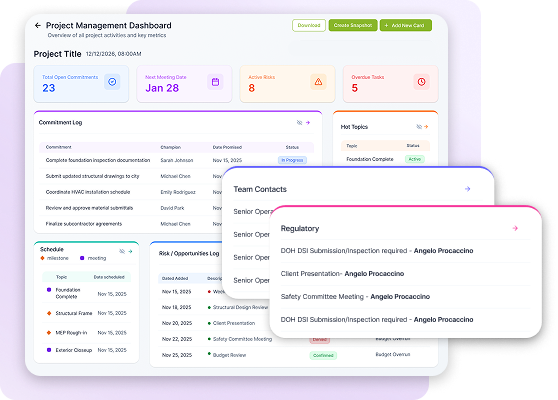
Each project opens into a Project Space with a dashboard composed of editable “cards” that summarize key indicators – Total Open Commitments, Next Meeting Date, Active Risks, Overdue Tasks – alongside structured logs including Commitment Log, Hot Topics, Schedule, Risk/Opportunities Log, Team Contacts, and Regulatory items. Every card is clickable and drills into a full detailed tab.
Modular custom cards
PMs can extend any dashboard with custom cards for project-specific tracking (e.g., Procurement, Submittals, Inspections). Each card is fully configurable – column names, data types (text, date, status, number, checkbox), visibility on the dashboard, and accent color. Card size is auto-determined by the number of visible columns (small = 1-2, large = 3-4), and the system enforces the A3 print constraint so the dashboard always fits on a single printable page.
Controlled client sharing
Every dashboard and every project tab can be shared with clients via a secure link. Shared links open a read-only view that requires no login, contains no editing controls, and always displays the most up-to-date project data – eliminating the “which version is latest?” problem entirely.
Snapshots & A3 PDF export
Users can capture point-in-time Snapshots of the dashboard state, browse historical snapshots on a dedicated tab, and export the current dashboard as a print-ready A3 PDF for status meetings and archival.
Role-based access
Admins manage users, clients, and project assignments. Managers see only the projects they are assigned to. Consultants and clients receive limited view-only access to specific projects, with the Clients tab hidden from external roles.
Technical Highlights
Configurable card schema
Dashboard cards are fully user-defined at runtime. Column data types (text, date, status, number, checkbox), visibility flags, and status-driven row filtering are all set in the UI without developer involvement.
A3-aware layout engine
The system continuously validates that visible cards fit the A3 export area. If a new card would break the layout, the user is guided to hide existing cards before proceeding – guaranteeing that every printed PDF is a single clean page.
Live shareable links
Client-facing dashboard and tab links are always live – recipients see the latest agreed status without logins, invites, or re-sends. Links have configurable expiration for security

Business Value
The system replaces hours of weekly Excel reformatting and email distribution with a live dashboard that every stakeholder already sees. Project managers prepare for client status calls in minutes instead of hours; clients open a single link and always see the latest agreed status; leadership gets portfolio-level visibility across all projects and phases.
The read-only sharing model removes the biggest friction point of the old workflow – sending, receiving, and reconciling spreadsheet attachments – while keeping full editing capability inside the firm. Snapshots preserve a defensible record of what was agreed and when, which matters for regulatory items and change orders.
Because the platform is tailored to architecture-specific workflows rather than adapted from a generic PM tool, adoption inside the firm is fast: PMs recognize their existing logs and columns, just structured and shareable. And because the dashboard is A3-print-ready by design, it fits into the firm’s existing client meeting culture from day one.

Conclusion
The BDA Architects Project Management Dashboard demonstrates PieSoft’s ability to translate a domain-specific manual workflow – architecture project execution tracked across dozens of Excel files – into a purpose-built web application that is both faster for the internal team and clearer for external clients. The project combines flexible schema design, layout-aware print rendering, and controlled client sharing into a single tailored platform that replaces spreadsheets without asking the team to change how they think about their work.
DO YOU HAVE A SIMILAR PROJECT IDEA?
No matter how complex your IT project goals are, our professional business analysts will increase the product quality while reducing its costs.
OUR HEADQUARTERS
We are open to new challenging tasks and we'd love to learn more about your project.


