
You’ve selected a great image sensor. The hardware is built. But when you power up the camera for the first time, the images look flat, noisy, or washed out. The colors are wrong. The edges are soft. Low-light performance is disappointing.
This is almost always an ISP tuning problem – not a sensor problem.
ISP tuning is one of the most underestimated steps in custom camera development. It’s also one of the most impactful. This guide explains what ISP tuning is, what it involves, and why skipping it or doing it poorly means your camera will never reach its potentia
What Is an ISP?
ISP stands for Image Signal Processor. It’s a dedicated hardware block – either inside your SoC or as a standalone chip – that takes the raw data coming off the image sensor and transforms it into a usable image.
Raw sensor data is not an image. It’s a grid of light intensity values – one per pixel – that needs to be processed before it looks like anything. The ISP handles this processing pipeline, which includes dozens of operations happening in real time on every frame.
What Does ISP Tuning Actually Involve?
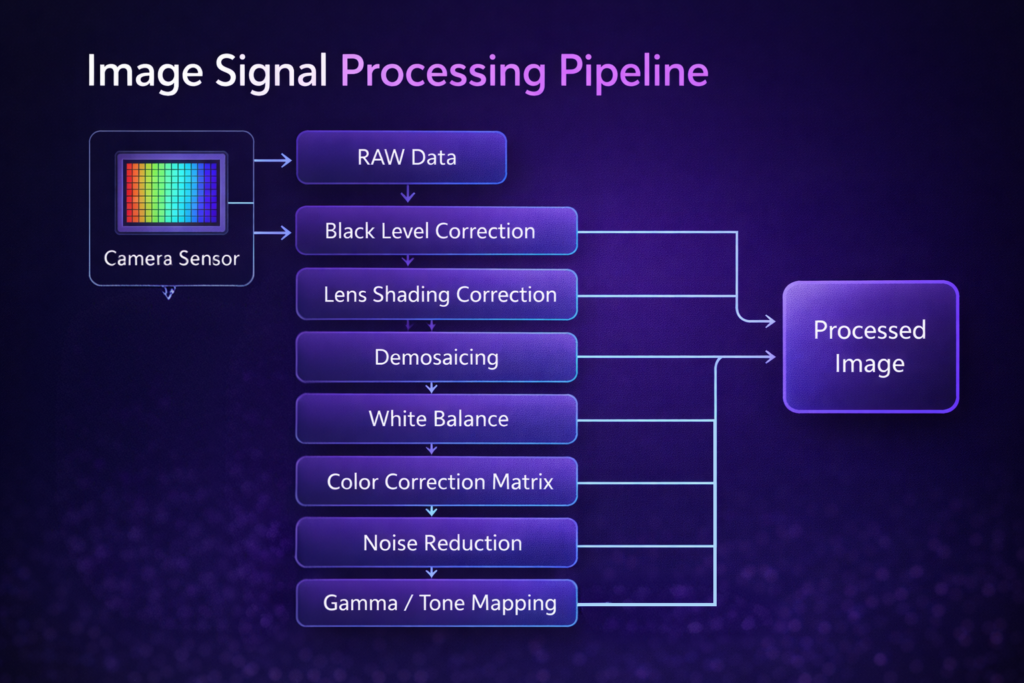
ISP tuning is the process of configuring and optimizing every stage of the image processing pipeline for your specific sensor, your specific optics, and your specific use case. The main stages include:
Black level correction – compensating for the sensor’s baseline signal in complete darkness. Without this, images have a gray cast or uneven brightness.
Lens shading correction (LSC) – correcting for the natural vignetting of the lens, which causes the corners of the image to be darker than the center. Every lens-sensor combination has a unique shading profile.
Demosaicing – converting the raw Bayer pattern (RGGB) into a full-color image. The algorithm used here significantly affects sharpness and color fringing at edges.
White balance – ensuring that white objects look white under your operating lighting conditions. Auto white balance algorithms need to be tuned for your specific environment — indoor fluorescent, outdoor daylight, IR illumination, and mixed lighting all require different approaches.
Color correction matrix (CCM) – transforming the sensor’s native color response to match real-world colors accurately. Every sensor has a different spectral response, and the CCM is calibrated specifically for your sensor.
Noise reduction – balancing between removing noise and preserving detail. Too aggressive, and the image looks plastic. Too conservative, and low-light images are grainy. Temporal and spatial noise reduction parameters need to be tuned for your gain levels and subject characteristics.
Gamma and tone mapping – controlling the brightness and contrast curve of the final image. This affects how the camera handles highlights and shadows, and determines the overall look of the image.
Sharpening – edge enhancement to compensate for optical blur and demosaicing softness. Over-sharpening creates halos and artifacts. Under-sharpening leaves images looking soft.
Auto exposure (AE) and auto gain control (AGC) – tuning how quickly the camera responds to changes in lighting, how aggressively it pushes gain in low light, and how it balances exposure time against motion blur.
Why Generic ISP Settings Produce Poor Results
Most off-the-shelf camera modules ship with default ISP settings optimized for a generic use case – typically indoor video at 30fps under standard lighting. If your product operates in any other conditions, those defaults will produce suboptimal results.
Common problems from untuned ISPs:
- Images look flat or have incorrect colors compared to real life
- Low-light performance is far below what the sensor is theoretically capable of
- Auto exposure hunts or responds too slowly to lighting changes
- Noise reduction smears fine detail in textured subjects
- White balance is incorrect under your operating lighting conditions
- Banding or fixed pattern noise visible in dark areas
All of these are tuning problems, not hardware problems. The same sensor with well-tuned ISP settings can produce dramatically better images.
ISP Tuning Is Use-Case Specific
This is the most important thing to understand about ISP tuning: there is no universal “best” configuration. The right tuning depends entirely on your application.
A camera for medical endoscopy needs different color accuracy, different noise handling, and different sharpening than a camera for outdoor security monitoring. A sports analytics camera optimized for fast-moving subjects needs different motion handling than a machine vision camera optimized for static inspection.
ISP tuning done properly means characterizing your sensor under your actual operating conditions — your lighting environment, your subjects, your temperature range — and optimizing the full pipeline for those conditions specifically.
The Tuning Process
Professional ISP tuning typically involves:
Measurement and characterization – using calibration targets (color charts, resolution charts, noise targets) to measure the sensor’s baseline performance and identify the gaps between raw output and desired output.
Parameter optimization – iteratively adjusting ISP parameters across the full operating range – different gain levels, different color temperatures, different scene types – and measuring the effect on image quality metrics.
Validation – testing the tuned configuration in real operating conditions with representative subjects and lighting to confirm that the improvements hold in practice, not just on test charts.
Algorithm selection – for some stages, choosing the right algorithm matters as much as tuning parameters. Different demosaicing algorithms, noise reduction approaches, and tone mapping curves have different trade-offs depending on the use case.
ISP Tuning and AI Vision Systems
If your camera feeds into a computer vision or AI inference pipeline, ISP tuning becomes even more critical – and the optimization target changes.
A camera tuned for human viewing prioritizes perceptual image quality: colors look right, contrast is pleasing, noise is invisible. A camera tuned for machine vision prioritizes consistency, contrast at the features the algorithm needs to detect, and predictable behavior across the operating range.
In many cases, the optimal ISP settings for human viewing and for AI inference are different. A camera system that feeds both a human operator and an AI pipeline may need separate processing paths or a carefully balanced compromise.
Working With a Camera Development Partner on ISP Tuning
ISP tuning requires specialized equipment (calibration targets, integrating spheres, spectroradiometers), software tools (ISP tuning frameworks, image quality analysis software), and experience with the specific ISP platform you’re using.
At PieSoft, ISP tuning is a core part of every custom camera project. We tune across the full operating range of the camera – not just on a bench under ideal conditions – and validate in your actual deployment environment.
If your camera project needs ISP tuning, or if you’re experiencing image quality issues that you suspect are tuning-related, get in touch – we’re happy to take a look.
Learn more about our custom camera development services.


